Complete supported tasks
Guide eligible customers through approved kiosk transactions, payments, and printing.
Government services
DMV errands are easier when they start where people already are. Biscuit adds a conversational, multilingual layer that helps customers understand the task, prepare the right info, complete supported transactions, or get routed to the right next step.
A friendlier first stop for routine motor-vehicle services.
Language: English · Español · 中文 · Tagalog · Tiếng Việt








Customers often know the problem, not the official term. They say "tags," "sticker," "insurance letter," or "license renewal." The kiosk turns that everyday language into the right flow.
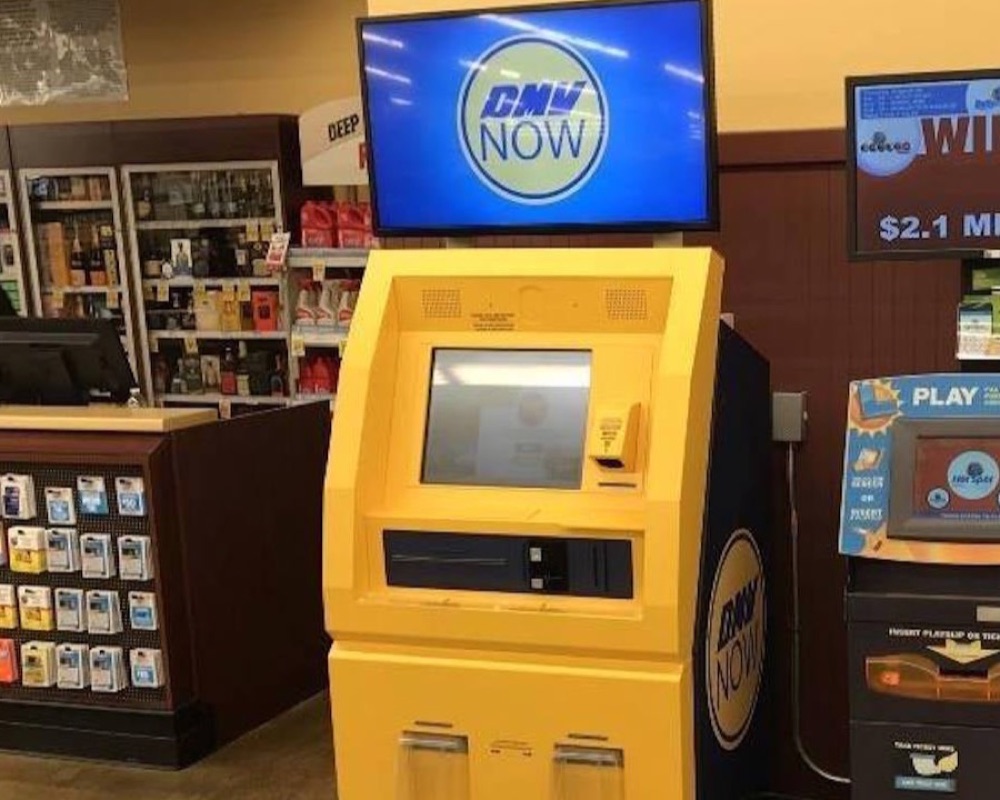
California DMV already uses self-service kiosks in DMV and retail locations, including some Safeway stores. Biscuit makes the first step more guided: ask in plain language, check what is supported, and leave with a clear outcome.
People already go to grocery stores. They are familiar, local, and often open later than government offices. That makes them a practical place to handle routine services, especially when someone needs to pay, print, scan, or figure out what to bring next.
Customers get convenience. Agencies get better routing. The store becomes more useful. Staff get fewer "where do I start?" questions.
The customer does not start with a menu. They start with a question.
Guide eligible customers through approved kiosk transactions, payments, and printing.
Build a checklist, find the right office or online service, and show what to bring next.
Clarify notices, unsupported tasks, fees, language choices, and handoff options.
Here is the simple flow.
"I lost my sticker." "I got an insurance letter." "Can I renew my license here?"
Biscuit checks whether the task is about a vehicle, ID, record, payment, notice, or appointment.
Supported task? Start the approved flow. Unsupported task? Explain why and route the customer.
Receipt, printed item, checklist, QR code, appointment direction, or support path.
Every request should end in one of three outcomes.
Explain requirements, documents, fees, notices, language options, and office alternatives.
Use approved systems and hardware to process eligible transactions, payment, and printing.
Route official reviews, identity-sensitive tasks, exceptions, and unsupported requests to the right DMV channel.
Language should not be hidden behind a menu. Put language choice on the first screen and keep the customer in that language wherever the approved workflow supports it.
Customers should not need the exact government phrase in English to get useful help.
The kiosk works when everyone gets a clear win.
A familiar place to start, clearer instructions, language support, and fewer wasted trips.
More routine tasks in the right channel, plus insight into which workflows confuse people.
A more useful errand destination that helps customers solve life-admin tasks while already in store.
Clear boundaries: staff help with the store environment, not DMV policy or account questions.
Top tasks, language needs, failed intents, abandonment points, and content gaps in one dashboard.





Useful DMV kiosks need more than a screen. They need the right location, hardware, approved content, integrations, privacy rules, and operating plan.
Easy to find, private enough to type personal info. Good locations include customer service areas, service corridors, and front-of-store perimeters.
Avoid: loud checkout lanes, tight vestibules, blocked accessibility paths, and places where people must speak personal information in a crowd.
Touchscreen, scanner, card reader, printer, privacy screen, accessible controls, monitoring, and signage as needed.
Supported transactions, document lists, payment rules, hours, contact paths, locations, languages, outages, and escalation rules.
Official transaction layer, payment, printers, appointment tools, QR/SMS handoff, analytics, and support tickets.
Ground answers in approved content. Use controlled language for high-risk topics. Route uncertain cases to official channels.
Monitor uptime, update content, brief store staff, track failed intents, and review the experience regularly.
Trust is the product. Biscuit should guide, explain, prepare, complete supported tasks, and hand off. It should not make eligibility decisions, override agency rules, provide legal advice, or guess when the official process is unclear.
The goal is simple: help more people reach the right part of the process with less confusion.
Measure whether the location works better, not just whether the screen gets touched.
Sessions by location, task intent mix, language selections, repeat usage.
Completion rate by task, handoff rate, abandonment, time to outcome.
Failed or unsupported intents, common clarification questions, staff interruptions, uptime.
Satisfaction, next-step clarity, confidence after the session.
Biscuit is built for customer-facing AI in physical places: kiosks, service counters, aisles, and lobbies where people need help now.
For DMV-style services, Biscuit adds the layer a static menu does not have: plain-language intent, multilingual guidance, approved workflows, safe handoffs, and analytics from real use.

Works in real locations with real foot traffic and real constraints.
Built around approved answers, task logic, and handoff paths.
Shows what people ask, where they stall, and what to fix next.





Start with one high-value workflow, one clear location strategy, and a safe handoff model. Biscuit can help design the experience and measure how people use it.